Shodhganga Search for Ph.D Theses in Social Sciences

Shodhganga is the reservoir of Ph.D theses submitted to various Indian universities in the country. There are about 1.5 lakh Ph.D these online available for reference for the researchers / teachers and those interested in academic reading. Theses from all the disciplines such as sciences, social sciences, humanities, management, engineering etc are available on the portal. Following is the step by step procedure to avail Ph.D theses of Social Sciences:

How to get Ph.D Theses of Social Sciences?

1) Log on to http://shodhganga.inflibnet.ac.in/

2) See the search box in the middle of home page. You can select Advanced Search / Subject Wise Search or can just type the researcher / thesis title etc if you know one.

shodhganga

3) For example, if you type Economics, all theses on Economics will be displayed on another page. You can shortlist from there as well.

4) Under Search: You can type University name, subject to get the theses from that particular university. You can also add more filters like Title / topic / researcher to further shortlist the theses. For example, see theses from Jawaharlal Nehru University.
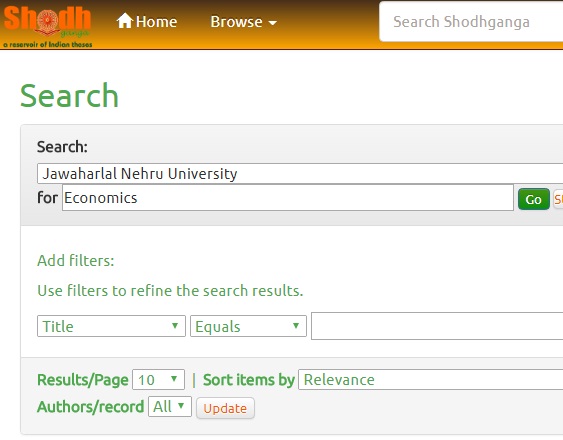
Sodhganga PhD

5) There displays all the Ph.D theses of Economics from Jawaharlal Nehru University. You can get the Ph.D thesis of your choice from there. You can download the PDF files and join them into a file.

6) You can get theses of any subject (political science, sociology, anthropology, history, etc) following the same procedure mentioned above.

Also Read: Search Shodhganga for all Ph.D Theses

How to Search Shodhganga for Ph.D Theses

Shodhganga project of UGC is immensely helpful for the research scholars across the globe. The thesis and research resources on the website (called as reservoir of Indian theses) will provide good material and research ideas to the aspiring scholars. Here is the procedure to search thesis on Shodhganga:

1) First log on to shodhganga.inflibnet.ac.in OR click on http://shodhganga.inflibnet.ac.in/browse?type=title .

2) The above link will take you to the Research Theses title category. Here you will find the title of theses, research scholar and guide / supervisor name of latest submissions. You can find some universities participating in Shodhganga project and uploaded Ph.D. thesis on the website.

3) You can browse the catalog through entering a few words related to your subject / research topic to get related thesis or proposals or research abstracts.

4) OR you can sort the entire website based on the title, submission date or in alphabetical order. this makes your search more easier and saves time.

5) After getting the title of the thesis you desired, you can click on the title. You will be directed to the brief description page which contains complete details of the research thesis with title, university, abstract and also links to chapters.

6) You can click on the chapters to get the copy of the research thesis. You may also download the chapters on to your hard disk or pen drive or desktop.

Use the resources for great work and produce good findings. Keep away from plagiarism.

error: Content is protected !!